FlexiRule Docs
Fetch Records
Configure the newer Query Records mode backed by Frappe's Query Builder API.
Fetch Records#
Fetch Records is a mode inside the Query Records action. It retrieves a collection of rows from a selected DocType through Frappe’s frappe.qb.get_query API. FlexiRule resolves supported dynamic values in the configuration, then passes the resulting query arguments to its Query Builder compatibility layer.
This is a newer mode. Do not assume it has exactly the same filter semantics or output behavior as the legacy Query List mode.
When to use it#
Use Fetch Records when you need a collection of matching rows with a configurable field list, filters, ordering, offset, and limit. Common next steps are checking the result, storing it in context, or passing it to a Loop.
Choose a different mode when you need a different shape:
- Exist Record for a yes/no existence result.
- Query Doc for a single document.
- Count, Sum, Average, Min, or Max when the supported aggregate mode meets the need.
- Query List when maintaining an existing configuration that uses that legacy mode.
Configure the UI#
The Fetch Records editor brings field selection and nested filter configuration together. The screenshot below shows the filter builder and returned-field configuration in the Fetch Records setup.
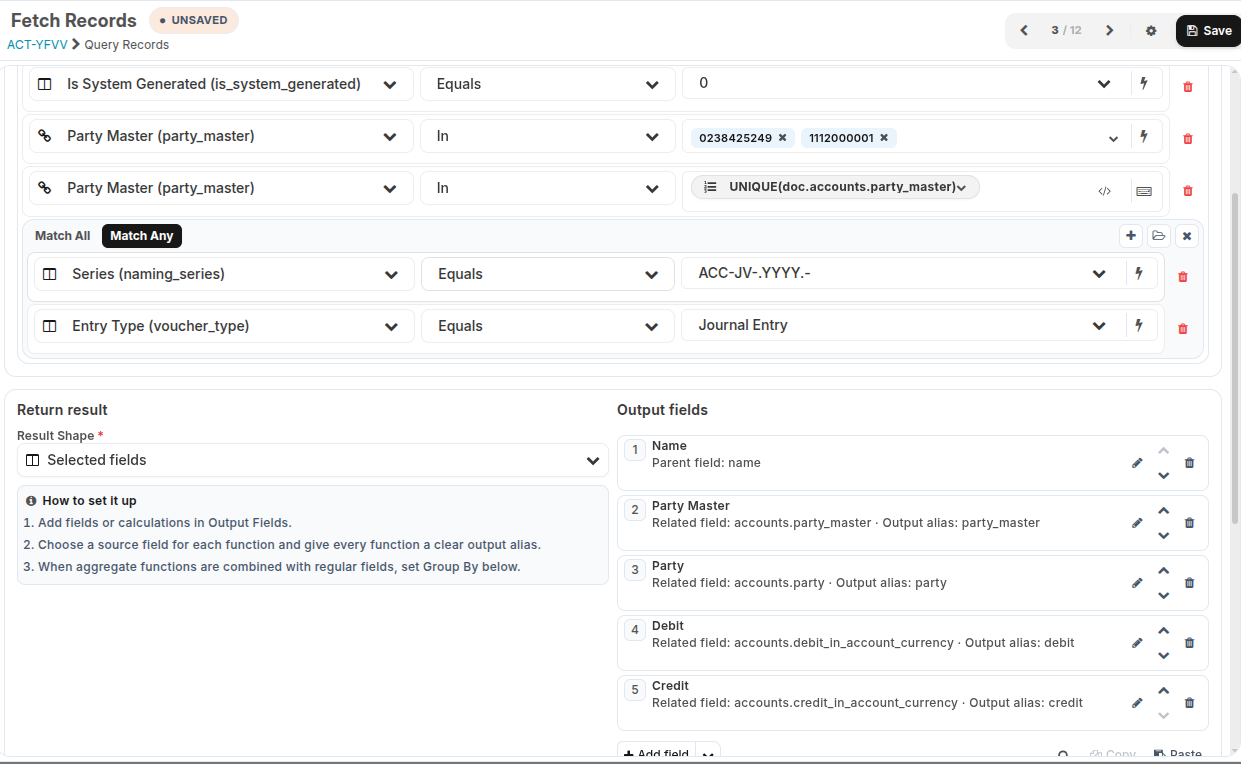
- Add Query Records to the canvas and choose Fetch Records as the Query Mode in the Setup panel.
- Select the Target DocType / reference DocType. The filter and field controls use this DocType’s metadata.
- Under Fields, select the fields to return. The selected field expressions are passed to Frappe Query Builder; leaving the field list empty omits the
fieldsargument, allowing the API’s default behavior to apply. - Configure Filters in the Fetch Records filter editor. The editor stores a structured filter tree; at execution time FlexiRule resolves dynamic values recursively and converts its canonical tree representation to the backend form when that representation is detected.
- Add Sort Criteria as needed. Each row specifies a field and ascending (
ASC) or descending (DESC) direction. - Configure Retrieval Settings. Set Limit Type and, when Custom Limit is selected, the Limit. The component also supports a Group By field, Offset, and a Deduplicate Rows (DISTINCT) setting where the relevant controls are available in the current UI.
- Under Execution Permission, keep Skip Permissions disabled unless the action has an approved reason to bypass read permissions. If enabled, provide the required Permission Audit Reason.
- Configure result handling using the action’s Result Handling / mutation mode. Fetch Records’ contract restricts its result type to List of Records. Store the result in a context variable so downstream steps can use it.
- Save, run Debug with representative data, and inspect the returned rows—including the empty-result case—before activating the rule.
The exact visible controls may depend on the installed version and selected DocType. The UI and backend contract for this mode are the source of truth.
Example: retrieve open invoices for the current customer#
Suppose a rule is triggered by a Sales Order and needs matching submitted Sales Invoices for the same customer. Configure the target DocType as Sales Invoice, then add filters equivalent to:
| Field | Operator | Value |
|---|---|---|
customer | Equals | Customer from the triggering document |
docstatus | Equals | 1 |
outstanding_amount | Greater Than | 0 |
Choose only the fields the next step needs, such as name, posting_date, and outstanding_amount. Add a limit and sorting criteria appropriate to the workflow. Store the output in a context variable, then inspect its actual shape in Debug before using it in a Loop or another action.
This is an illustrative configuration, not a query string to paste. Choose the fields and operators using the real UI controls and verify that they are supported by the DocType metadata and installed Frappe version.
Filters and dynamic values#
The configuration can contain nested lists and dictionaries, and the runtime recursively resolves FlexiRule value expressions within them. When the filter editor emits FlexiRule’s canonical tree format, the backend adapts that tree to a backend-compatible filter representation. Other query semantics—including field parsing, joins, and filter validation—are delegated to Frappe Query Builder.
This is intentionally not a separate FlexiRule query language. In particular:
- Do not assume every arbitrary linked-field path, SQL expression, or nested child-table filter is supported.
- Do not assume list filters containing an infix string such as
"or"behave as a logical OR; the Frappe Query Builder capability audit for the current app branch identifies this form as unsupported/broken. - Use the nested group controls exposed by the editor, and test AND/OR combinations against known records.
- Dynamic values are resolved before the query is executed. Use the value picker and filter editor rather than hand-authoring an undocumented payload shape.
Sorting, limit, offset, grouping, and DISTINCT#
Fetch Records passes configured fields, filters, order_by, group_by, limit, offset, and distinct arguments to the compatibility layer when those values are present. limit and offset are validated as non-negative integers when statically provided; blank values and some dynamic expressions are allowed through to runtime resolution. Query Builder remains responsible for validating its own arguments.
The configuration UI contains retrieval controls for sort criteria, limit type/custom limit, grouping, and DISTINCT; some fields can be hidden or conditional. Do not interpret the presence of a Group By control as proof that arbitrary aggregate expressions or every grouping pattern are supported. Use the dedicated aggregate modes for Count/Sum/Average/Min/Max where appropriate.
Offset is useful for bounded query windows, but the documented UI/runtime path should not be treated as a complete pagination iterator: the action returns one query result and does not itself promise automatic page traversal.
Result shape and downstream actions#
Fetch Records’ contract fixes the result type to List of Records. The action handler returns the rows from the Query Builder compatibility function and routes to its configured next step. Result storage is controlled by the action’s result-handling/mutation settings (for example, setting a context variable or appending/updating a context variable).
Do not assume a result is a full Frappe Document instance. It is a list of row data returned by the query API. Use Debug to confirm the exact fields and values available in your installed environment before referencing them downstream.
Permissions and security#
The action exposes Skip Permissions and a conditional Permission Audit Reason field. The backend passes the result through FlexiRule’s can_ignore_permissions guard and the Query Builder compatibility layer. The UI indicates that skipping permissions is privileged and requires an audit reason; the contract also marks permission-related controls as restricted to System Manager.
Keep permission bypass disabled by default. Enabling it can expose records the executing user would not ordinarily be allowed to read. Follow your site’s security policy and record a clear reason whenever bypass is authorized.
Validation and troubleshooting#
The backend validates that a target DocType is present and that its metadata can be loaded. Static limit and offset values must be non-negative integers; distinct must be boolean-like when provided. Plain field references in filters are checked against DocType metadata where the validator can identify them. The complete native filter payload and field-expression semantics are deliberately left to Frappe Query Builder.
| Symptom | What to check |
|---|---|
| Target DocType error | Confirm the DocType exists and is selected in the action setup. |
| Missing-field validation | Re-select the field from the metadata-driven picker and verify its fieldname on the target DocType. |
| Query fails at runtime | Inspect the error and test the same filter/field shape against the installed Frappe Query Builder API. |
| Unexpected OR behavior | Use the editor’s nested groups and verify the saved tree; do not use an infix "or" string in a list filter. |
| Empty rows | Verify the filters, dynamic values, permissions, and expected test records. |
| Slow or large result | Narrow filters, select only necessary fields, and set a reasonable limit. Avoid unbounded reads on large DocTypes. |
| Different result than Query List | Treat the modes as separate implementations and compare their output and filter semantics explicitly. |
Compatibility with Query List#
Fetch Records and Query List are distinct modes in the same action. Fetch Records uses frappe.qb.get_query through the compatibility helper; Query List uses its existing legacy handler path. The application code inspected here does not establish that all legacy Query List configurations are automatically migrated to Fetch Records. Preserve existing Query List configurations unless a separately verified migration explicitly changes them.
Current limitations#
- Query Builder behavior depends on the installed Frappe version and its supported query arguments.
- The mode does not promise automatic multi-page traversal.
- The presence of a Group By control does not establish support for arbitrary aggregate SQL expressions.
- Filter support must be tested for nested groups, linked fields, and child-table scenarios that matter to your rule.
- Do not treat Fetch Records as production-ready solely because it is selectable; validate representative cases, permissions, and expected result sizes in your own site.
Related guides#
Was this page helpful?